Fix 'Your Windows License Will Expire Soon' Error
How to fix this error?
When you face this error for the first time, shut down your PC and restart it again. If the error still pops up, try the following solutions –
Restart the Windows Explorer Process
- Next go to search Menu, type Command Prompt (CMD) and Select Run As Administrator
- Now in command prompt, type slmgr –rearm and press Enter
- At last, restart your computer
Note: Many users have got rid of this error using this method quickly
Method 2: Group Policy Edit
Group Policy is a tool that can be used by a network administrator handling the Microsoft Active Directory. It is not usually operated by users as it is used for configuring network settings, passwords, startup programs and much more.
Tweaking the Group Policy can remove the “Your Windows License will expire soon” error. Here are the steps to do it –
- Press Window+R to open the Run Dialog box
- Next in the Run Dialog box, type gpedit.msc and press Enter or click OK.
- Next in Local Group Policy Editor window, on the left pane, navigate to Computer Configuration > Administrative Templates > Windows Components > Windows Update.
- Now in the right pane, double click on No auto-restart with logged on users for scheduled automatic updates installations option
- Now in the next window, select Enabled checkbox and click on Apply and OK to save changes
Method 3: Edit Registry
The Windows Registry is the database of settings, values and options of the different software and hardware in your system. Making a few changes to the registry might renew your OS policy and resolve the issue.
Follow the steps below to modify the Windows Registry –
- Press Window + R to open the Run dialog box on your system
Next, type regedit.exe on Run dialog box and press Enter or click OK
Export the current Registry before modifying it. Click on File> Export
- Then, select All as the Export range and choose a file name. Save it in a safe location and remember it
- It is important to do this. If something goes wrong, you can just execute this file and the older settings of the Registry will be restored on your system
- Next, go to search Menu, type Command Prompt (CMD) and Select Run As Administrator
Now in command prompt, type the following command and press Enter
reg add “HKLM\Software\Policies\Microsoft\Windows NT\CurrentVersion\Software Protection Platform” /v NoGenTicket /t REG_DWORD /d 1 /f
Method 4: Find the Product Key using Command Prompt
You can use the command prompt to locate the product key of the Windows version. You can re-enter the key to renew your OS license.
Find the key using these steps –
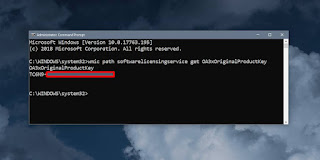
- Go to search Menu, type Command Prompt (CMD) and Select Run as Administrator
Next in command prompt, type the following command and press Enter
wmic path SoftwareLicensingService get OA3xOriginalProductKey
Now, press Window + I and click on Update & security option
.
Using these steps, your Windows version will be activated again.
Method 5: Disable Two Windows Services
Windows services enable the creation and execution of other processes. You can fix the license error by disabling these two services –
- Disable Windows License Manager Service
- Disable Windows Update Service
First, press Window+R to open Run dialog box. Next in the Run dialog box.
Next type services.msc and press Enter to open Service Manager.
Disable Windows License Manager Service
- Next locate Windows License Manager Service and double click on it
- Next in the Properties window set the Startup type to Disabled and click on Stop button (if service status is running) to stop the service
- Now click on Apply and OK to save changes
Disable Windows Update Service
- Next, locate Windows Update and double click on it
- In the Properties window, make sure the Startup type is set to Disabled. Then, click on the Stop button to stop the service (if you find the service still running)
- Now click on Apply and OK to save changes
These steps are sure to resolve the license error. If the message persists, enable the services again.
Method 6: Using Activation Troubleshooter
The Microsoft Activation Troubleshooter is useful for verifying the originality of a Windows version and if it is being used in more than one device. You can use this to solve common activation errors. But the Activation Troubleshooter is useful only if you are using Windows 10 version 1607 or above.
Here are the steps to use the feature –
- Press Window + I and click on the Update & Security option
- Now, on the left pane click on the Activation option
- All the activation errors will be displayed here
- Launch the Activation Troubleshooter by clicking on Troubleshoot, and you will be on your way
- The Troubleshooter will detect the current activation errors on your system and fix them automatically
- After the entire process is over, click on the Close button
Check Your Date and Time
Every license has a date and time of activation/ expiry. So, check to see whether your system’s date and time has been messed up, as this might be the reason for the license error. For this, you have to go to the Date and Time settings and check.
Follow these steps given below –
- Go to the Search Menu, type Date & Time Settings and press Enter or click on Open





.jpeg "Apple Configurator 2 Log Location")


